

The Highs and Lows of AMOLED Screens: A Comprehensive Guide to Green Line Issues
Introduction
The Rise of AMOLED Screens in Modern Devices
AMOLED screens are becoming increasingly popular in modern devices because they can display deep blacks and vibrant colors, are flexible, power efficient, and provide better viewing angles. AMOLED screens emanate self-light, which obviates the necessity of backlights, thereby making them more slender and supple. Since every pixel can be turned off completely while displaying dark or black colors, they are power-efficient. AMOLED screens retain their striking colors and contrast even if viewed from an angle. Their advantages make modern devices prefer them as the best option, and this trend is expected to continue rising.
 |
| Source -By OnePlus community |
The Annoying Green Line Issue on Some AMOLED Screens
However, there is a frustrating issue that plagues some AMOLED screens: green lines. These lines can appear vertically or horizontally across the screen, causing a distracting and unsightly effect.
Not only do green lines ruin the visual appeal of an otherwise top-notch display, but they can also cause functional problems over time. So what causes these green lines?
And how can you prevent or fix this annoying problem? In this article, we'll dive deep into everything you need to know about green line issues on AMOLED screens.
From identifying the problem to exploring different types of issues and potential solutions - we've got you covered. Let's get started!
What are Green Line Issues on AMOLED Screens?
AMOLED screens are some of the most popular display technologies used in modern electronic devices such as smartphones and tablets. They offer users a high-quality visual experience with excellent color reproduction and contrast.
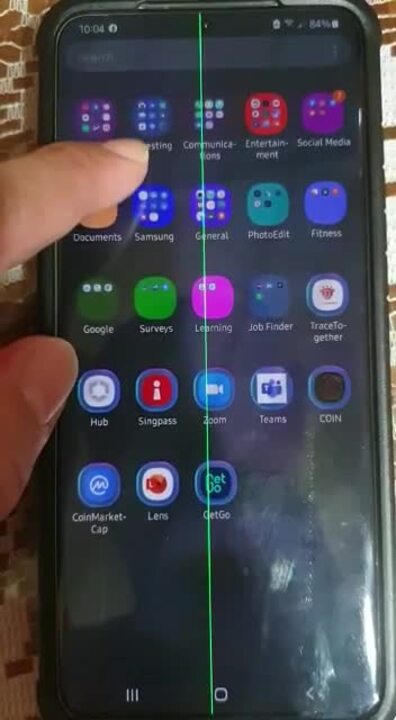
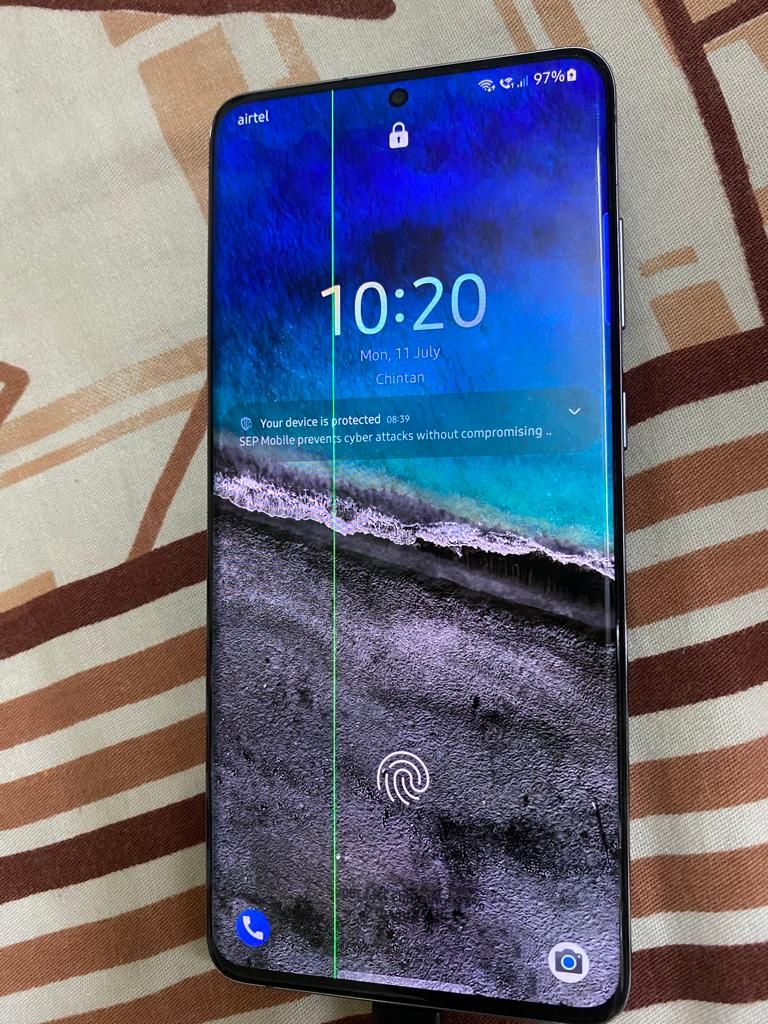
However, despite their advantages, AMOLED screens can be prone to certain issues, one of which is the infamous "green line" problem. The green line issue manifests itself as a thin vertical line of green pixels that appears on the screen.
 |
| Source -By Samsung community |
The color might vary depending on your display settings or phone model. This anomaly can be extremely frustrating for users who expect nothing but high-quality performance from their device's display screen.
Explanation of the Causes Behind the Issue
There are several possible causes behind this green line issue on AMOLED screens. The most common cause is manufacturing defects that occur during production or assembly of the device.
These defects can lead to damaged pixels or improper alignment of components, which then create the green lines. Another possible cause is physical damage to the screen due to accidental drops or wear and tear over time.
The impact from these accidents can cause internal damage that leads to malfunctioning pixels on your device's screen. It's also important to note that software glitches and bugs can sometimes play a role in causing green lines on your screen; however, this happens very rarely.
Discussion of the Impact that Green Lines Can Have
Green lines can have a detrimental impact on both device functionality and user experience. They affect image quality by making individual pixels appear discolored and distorted, ultimately leading to an inferior visual experience for users. Not only do they degrade image quality but they also affect touch accuracy since they could interfere with your phone's touchscreen responsiveness which could result in difficulties typing out messages or working with apps whose buttons coincide with where the green line has appeared.
It's essential to understand that the green line issue is common in AMOLED screens, and its causes are varied. It is highly recommended to seek professional support in case you encounter this problem with your device, as the solution might include getting a replacement screen or even having to buy a new phone altogether.
Types of Green Line Issues on AMOLED Screens
The Many Forms of AMOLED Screen Frustration
Green line issues are not a one-size-fits-all problem. Each manifestation has its own unique characteristics and potential causes.
Vertical lines, for instance, appear as thin green stripes running up and down the screen. These may be caused by manufacturing defects or physical damage to the screen's internal components.
Horizontal lines, on the other hand, are green bars that run across the screen from one edge to another. These can be caused by issues with the screen controller or signal interference.
Scattered lines are yet another form of green line issue - these appear as tiny dots or specks throughout the display area. This type usually results from manufacturing defects in individual pixels that make up the screen's image.
An In-Depth Exploration
Each type of green line issue warrants its own thorough examination in order to understand what causes them and how they appear on your device's AMOLED screen. Vertical lines can indicate a fault in either the conductive elements that run vertically through each column of pixels or an issue with LCD drivers responsible for image reproduction on-screen. Sometimes these problems arise from manufacturing faults, but environmental factors such as temperature changes can also affect display quality over time.
Horizontal lines may result from an issue with wiring inside your device's display circuitry or due to failing capacitors causing distorted voltage to specific segments of your AMOLED panel. Unlike vertical lines which typically create a grid-like pattern on top of existing visuals, horizontal bars break up images into distinct bands that are often more noticeable than thinner streaks.
Scattered lines are problematic because they occur at random intervals throughout an image area rather than showing up consistently in any particular region like vertical and horizontal varieties do. This type is often caused by improper alignment between layers within OLED displays or defects in individual pixels themselves.
 |
| Source -By Realme community |
How to Identify Green Line Issues on AMOLED Screens?
If you're experiencing strange display issues on your AMOLED screen, it might be due to green line problems. The first step in resolving the issue is to identify whether your device has this problem or not. Thankfully, there are a few tips you can use to diagnose your screen and determine if it's a green line problem or something else entirely.
Tips for identifying whether a screen has a green line issue or not
The easiest way to identify if your screen has the infamous green lines is by looking for vertical or horizontal lines that appear out of nowhere. These lines are most visible when the background is white or light-colored, but they can also be seen on other colors. If you notice these lines appearing in different parts of the screen, then it's very likely that your device has green line problems.
Explanation of common symptoms to look out for, such as flickering or discoloration
Another common symptom of green line issues is flickering and discoloration on the AMOLED display. Flickering will cause parts of the display to go black and then come back on again in rapid succession.
Discoloration refers to areas where there's a noticeable difference in color between two adjacent pixels. Usually, flickering only occurs when there's low brightness on the device; however, discoloration can occur no matter how bright or dark the display might be at any given time.
Overall, it can be quite challenging to identify if you have green line issues without careful inspection. However, once you do identify them correctly, there are several ways through which one can fix them without much hassle!
 |
| Source -By Realme community |
Prevention and Solutions for Green Line Issues on AMOLED Screens
Don't Drop Your Phone Like It's Hot
One of the best ways to prevent green line issues on your AMOLED screen is simply to be careful with your device. Don't drop it, don't toss it in your bag without a case, and don't expose it to extreme temperatures. All of these things can cause physical damage to your screen, which can lead to green lines or other issues.
Update Your Software Regularly
Another way to prevent green line issues is by keeping your software up-to-date. Many manufacturers release software updates specifically designed to fix common screen issues.
These updates often include bug fixes that address green line problems. So, make sure you're regularly checking for and installing software updates on your device.
Screen Replacements as a Solution
If you're already experiencing green line issues on your AMOLED screen, there are some solutions available. One option is to get a screen replacement from an authorized repair center. This can be costly, but it's often the most effective solution if the problem is caused by physical damage.
Gentle Massaging Can Help Too!
But before going that route try massaging the affected area gently with a microfiber cloth or applying gentle pressure using a blunt object like the eraser end of a pencil or pen cap. This action may help redistribute pixel elements within the display panel and reduce or even clear away minor cases of this issue.
There are many preventative measures you can take to avoid green line issues on your AMOLED screen including being careful with physical handling of the device and staying up-to-date with software updates from manufacturers. And if you do encounter this issue, remember that replacements are always an option for fixing them but sometimes all you need is a gentle massage to the affected area.
 |
| Source-by Samsung community |
Conclusion
After exploring the various types, causes, and solutions for green line issues on AMOLED screens, it's clear that this is a problem that needs to be addressed by manufacturers. Users should not have to deal with faulty screens or spend money on replacements due to defects that are out of their control.
The Need for Better Quality Control
The fact that green line issues can be caused by manufacturing defects highlights the need for better quality control measures. Manufacturers should take responsibility for ensuring that their products are free from defects before they hit the market. Of course, some defects may still slip through, but it's unacceptable for a significant number of users to experience an issue like green lines due to poor quality control.
Advancements in Screen Technology
Despite the prevalence of green line issues on AMOLED screens, it's worth noting that screen technology is constantly advancing. OLED displays have become more popular in recent years and offer improvements in areas such as color accuracy and power consumption. As new technologies emerge, we can hope that these issues will become less common.
A Call to Action
Manufacturers need to take responsibility for addressing green line issues on AMOLED screens through better quality control measures and offering fair solutions when these problems do arise. As consumers, we can also advocate for change by choosing brands with a reputation for high-quality products and holding companies accountable when they fall short. By working together towards a common goal of better screen technology and improved user experiences, we can help ensure that green line issues become a thing of the past.
